MACOS DESKTOP
Track the trade. Fix the trader.
It imports your fills and computes the P&L like the others. Then, when you break a rule you set yourself, it closes your charts and keeps closing them until you stop.
macOS desktop. Your data never leaves it.
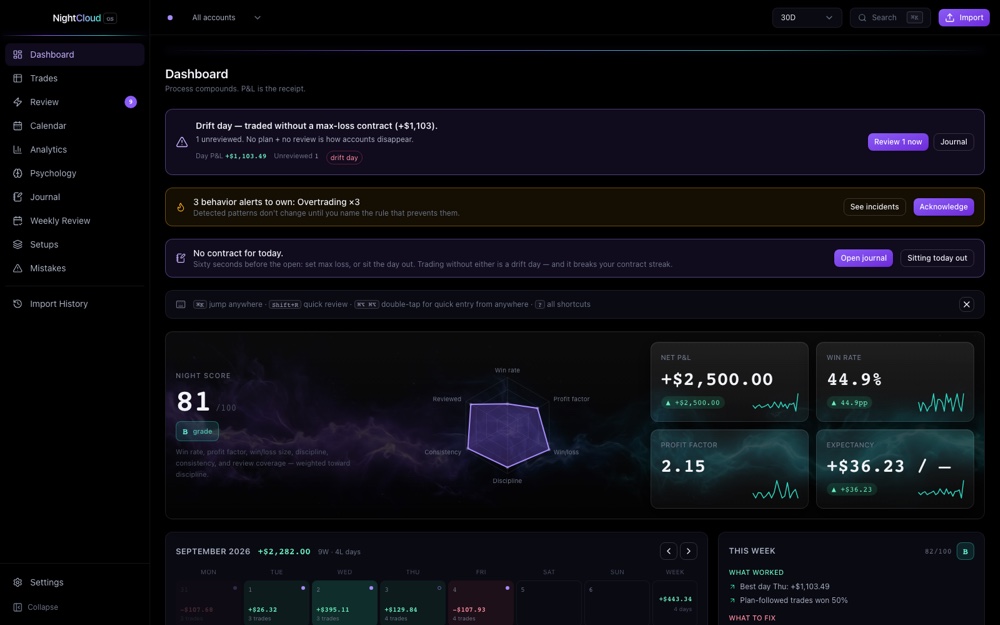
Sample data, shown so the interface is visible. It is nobody's account and it forecasts nothing.
TILT LOCK
It can close your charts. A browser tab cannot.
Set a max-loss for the day, a trade cap, or leave the revenge and overtrading detectors armed. When one fires, NightCloudOS force-quits TradingView and your browser, and keeps re-closing them until you unlock it.
Every other journal on the market runs in a tab. A tab cannot close the window it lives in. This is the reason the app sits on your desktop instead of behind a login, and it is the only feature here that a web product cannot ship next quarter.
You set the limits. You can unlock it. Both the breach and the unlock are written down.
Every other journal
Runs in a browser tab
It can show you the breach after the fact. It cannot close the window it is living inside.
NightCloudOS
Runs on the machine
It closes TradingView and your browser, and keeps closing them until you unlock it.
You already know which trade broke your day.
You just have not opened it back up to look.
The old way
You log the trade, see the same win rate you already knew, and move on without ever looking at the moment it actually went wrong.
NightCloudOS
Quick Review puts you back inside that exact trade in under twenty seconds: what you did, what you told yourself, whether you followed your own plan.
How it works
The core loop
Four steps, in order. Import is the workflow. Everything after it is where the work happens.
01
Import
Tradovate, NinjaTrader and TopstepX presets, or map any CSV yourself. Fill-pairing and dedup happen automatically, with batch history you can roll back.
TRADOVATENINJATRADERTOPSTEPXANY CSV02
Calculate
It computes the P&L across seventeen seeded contract specs, in points, ticks and R-multiple, with a sanity warning whenever reported and computed disagree.
POINTSTICKSR-MULTIPLESANITY CHECK03
Review
Quick Review is a full-screen, keyboard-only queue at under twenty seconds a trade. Followed plan, setup, mistakes, emotions, lesson, grade.
KEYBOARD ONLYFULL SCREEN04
Score
Your Discipline Score moves: a deterministic formula over plan-following, mistake severity, risk breaches and detector hits.
DETERMINISTICNOT AI GUESSWORK
PRE-TRADE GATE: ARMED
Something is watching before you click buy.
The companion sits on screen while you trade. Double-tap Cmd and Option before a trade and it opens a gate: setup, stop and confluences required before the trade can be logged.
When a risk trigger fires it hands you a short challenge instead of a trade ticket. Override it if you want, but you cannot pretend you did not see it. Both get logged.
Hey. Are you about to click, or are you already in?
The cat is not checking anything. Saying it out loud is the check.
It is the rubber duck programmers keep on the desk, pointed at a position instead of a bug.
You already know these moments.
Four detectors run on every import and catch them before you have to admit it to yourself.
Revenge trading
The loss stings, so you are back in ninety seconds later, bigger, with no new reason. That is the exact pattern this one is built to catch.
Overtrading
You hit your own daily limit an hour ago and you are still clicking. The count does not stop just because you stopped counting.
Loss-chasing
Down for the day, so you size up to make it back faster. That is not conviction. It is the math working against you.
Max-loss breach
You set the line before the session, when you were calm. This is the detector that remembers it after you stop wanting to.
A discipline problem does not fix itself between sessions.
Every day you trade without reviewing it is another rep of the same mistake. A daily journal with a premarket plan, a max-loss commitment and a checklist. A weekly review with auto-compiled stats and one mandatory focus that carries into the next week. The calendar makes the pattern impossible to miss.
Local first
It runs on your machine.
An encrypted SQLite database on the Mac you installed it on. No account, no cloud copy, no telemetry, and your fills never leave the laptop. The AI insights are opt-in and use your own OpenRouter key, so even those go out under your name and never carry raw fills or account identifiers.
One-time purchase
Buy it once.
$500
Pay once and the version you bought is yours. No seat limit, no expiry, no second invoice.
Most trading journals rent you the software forever. This one you buy, and it keeps working whether or not anything else does.
Questions, answered.
Is this a subscription?
No. One payment and the version you bought is yours, with no seat limit and no expiry.
Does it work on Windows or Linux?
Not today. It is a macOS app and that is the honest answer rather than a roadmap promise.
Is my trading data private?
Your trades sit in an encrypted database on your own machine. There is no account and no cloud copy. The only thing that ever leaves the laptop is a licence check carrying a licence key and a machine identifier, never a fill and never a balance.
Do I need an OpenRouter key for the AI insights?
Only if you want them. Everything else works without one. When you do connect a key, what gets sent is a compact behaviour summary, never raw fills or account identifiers.
Can I resell or share my licence?
No. It is licensed to you and bound to your machines.
What happens right after I pay?
You get a download and a licence key. Activation runs once, and after that the app works offline.
The trader who reviews every session is not the same trader who skips it.
Buy NightCloudOS$500 once. macOS, today.